A fully static Terraform registry
Terraform already supports setting a module’s source argument to a git or Mercurial repository path, S3 path, and more. It even supports direct HTTP URLs, as long as you follow some guidelines.
However there are situations where you might prefer using the Terraform registry protocol, mainly for the ability to use version constraints:
module "release" {
  source  = "tfr.davidguerrero.fr/modules/helm-release/kubernetes"
  version = "~> 0.1.0"
  ...
}
This would for example allow Terraform to install any minor releases (0.1.X), but you can also express more complex constraints like ">= 1.2.0, < 2.0.0". It is particularly useful when you are dealing with multiple layers of module dependencies and need to apply a fix without bumping all module versions.
Making it static
Serving a Terraform registry traditionally involves running at least a container or pod on a server, like the boring-registry. A form of long-term storage is usually needed as well, like an S3-compatible object store.
Going fully static has two components: generating the appropriate files, then statically serving those files. The advantages are numerous: low costs, low maintenance, high scalability…
I’ve found some repositories [1, 2] aiming to build a static Terraform registry, backed only by a storage bucket. These attempts seem to be successful, though limited to the provider registry protocol which is slightly less demanding than the module registry protocol.
The module registry protocol
The main problem lies in the download endpoint (/:namespace/:name/:system/:version/download):
- The return HTTP status code must be
204 No Content. - A
X-Terraform-Getheader must be returned with the URL of the module package.
Unfortunately neither of these rules is easy to deal with in a purely static way (e.g. S3 static website hosting).
Why these requirements exist in the first place is also a good question, when Terraform otherwise has no issue fetching modules via HTTP URLs as long as a given <meta> tag is present in the page’s HTML content. This is much easier to serve statically but doesn’t support the registry protocol and version constraints.
Some details however do work in our favor:
- The value of
X-Terraform-Getcan be a relative path like./module.tar.gz. - Terraform doesn’t technically enforce the status code rule, so a regular
200would work even if it doesn’t respect the protocol.
Modern CDNs make our lives easier
Fortunately it’s now quite easy to deal with these issues by serving the files through a modern CDN. It’s a good practice to serve static files through them anyway, though it requires additional configuration if you need to keep your registry private.
I’ll show how to solve this with three different CDN providers: Bunny.net, Amazon CloudFront and Cloudflare. An example Terraform module is provided for each of them, so feel free to try it at home!
Bunny CDN
Bunny CDN supports setting Edge Rules in your Pull Zone, at no additional cost.
A single Edge Rule can be used to both set the HTTP status code to 204 No Content and the X-Terraform-Get header:
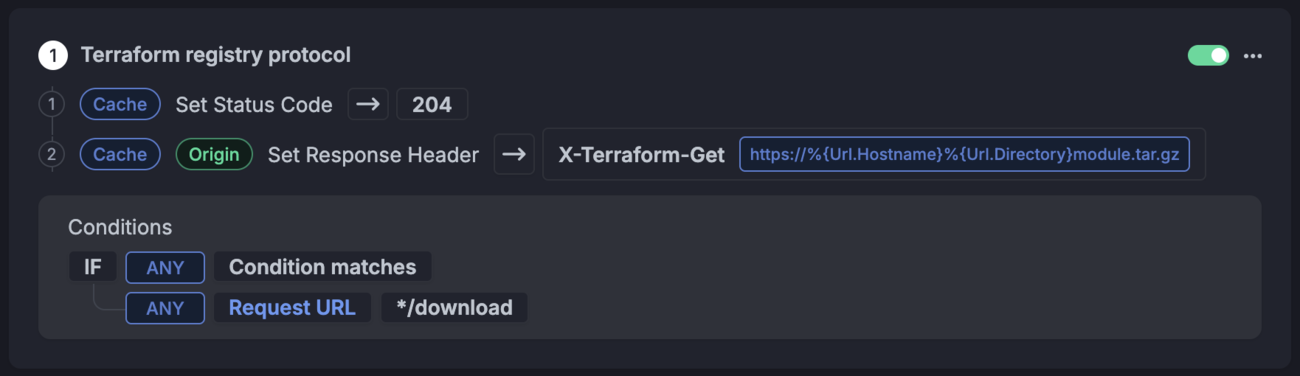
Bunny.net has the easiest setup and feels the most ‘static’.
The rule matches the */download paths and sets the X-Terraform-Get header to https://%{Url.Hostname}%{Url.Directory}module.tar.gz, which generates the module download URL.
An even simpler solution is to use a relative path for the header value: ./module.tar.gz. Both work fine, so the choice is yours :)
You can find a full example module using a Bunny.net Pull Zone and Scaleway for object storage on my Terraform registry.
Amazon CloudFront
CloudFront gives you two options: partially support the protocol by adding the custom header via a response headers policy, or fully support the protocol (including status code) via a CloudFront function.

The policy is fairly simple but should be limited to */download paths.
Functions are technically billed at $0.10 per 1 million invocations, though the first 2 million invocations are free for pay-as-you-go, and are included in the new flat-rate pricing plans. Response headers policies are free but not available in the free flat-rate plan.
Here’s a minimal CloudFront function handling the protocol details:
function handler(event) {
  const request = event.request;
  const uri = request.uri;

  if (uri.endsWith('/download')) {
    return {
      statusCode: 204,
      statusDescription: 'No Content',
      headers: {
        'x-terraform-get': {
          value: './module.tar.gz'
        }
      }
    };
  }

  return request;
}
An example module using CloudFront and S3 is also available and implements both approaches via the use_cloudfront_function variable.
Cloudflare
In a similar fashion, Cloudflare has two ways to support the protocol:
- Partially by adding the header in a response header transform rule
- Fully by using a worker script

The rule additionally checks the hostname in my case.
Both options are available in the free plan, though worker scripts have stricter usage limits.
A minimal worker script can be very similar to our previous example:
export default {
  async fetch(request, env, ctx) {
    const url = new URL(request.url);
    const uri = url.pathname;

    if (uri.endsWith('/download')) {
      return new Response(null, {
        status: 204,
        statusText: 'No Content',
        headers: {
          'X-Terraform-Get': './module.tar.gz'
        }
      });
    }

    return fetch(request);
  }
};
Likewise, an example module using Cloudflare and an R2 bucket for object storage is available. You can also use both approaches through the use_worker variable.
Keeping the registry private
Serving private content through CDNs requires careful planning so I’d suggest looking up the relevant documentation for your provider beforehand. Implementation will also vary depending on your security requirements.
Specifically for Terraform, you can set either a credentials block in the .terraformrc file, or specific environment variable credentials.
The token is then sent in the Authorization header as Bearer <token>, which you can validate at the edge. Validation can happen through static rules or functions, depending on how you plan to distribute tokens. It’s a good idea to limit the IP ranges that can access private registries as well.
Generating the files
Now that we can serve our modules and handle the registry protocol, the remaining piece of the puzzle is generating the files going into the object storage bucket.
I built a generator tool called tfr-static to help with this. It takes a git repository hosting Terraform modules as input and generates all necessary assets to make the registry work.
The necessary files
Per the protocol, modules are expected to follow the /:namespace/:name/:system/:version/ naming scheme. A /.well-known/terraform.json file is required. Keeping the module archive name the same for all modules makes things much easier to serve: module.tar.gz. Finally, the root of each module must have a versions file, while each version must have a download file. This gives us the resulting directory structure for the modules namespace:
/
├── .well-known/
│   └── terraform.json
└── modules/
    └── dns-zone/
        └── hetzner/
            ├── versions
            └── 0.1.0/
                ├── download
                └── module.tar.gz
tfr-static publish will generate these files from a directory containing the modules, for example:
my-modules/
└── hetzner/
    └── dns/
        └── zone/
            ├── main.tf
            └── variables.tf
Handling module versions
As a system to control the versions, the simplest idea was to use a version control system. In this case git tags are expected for each module, matching their directory structure: hetzner/dns/zone-0.1.0. This gives the ability to generate files for each version of each module if needed.
Tagging can be done interactively via the tfr-static tag command:

You can type to filter, use arrows and enter to select.

The release type hints could be debated.

The tool can also generate HTML files to serve as documentation for the modules, with support for terraform-docs.
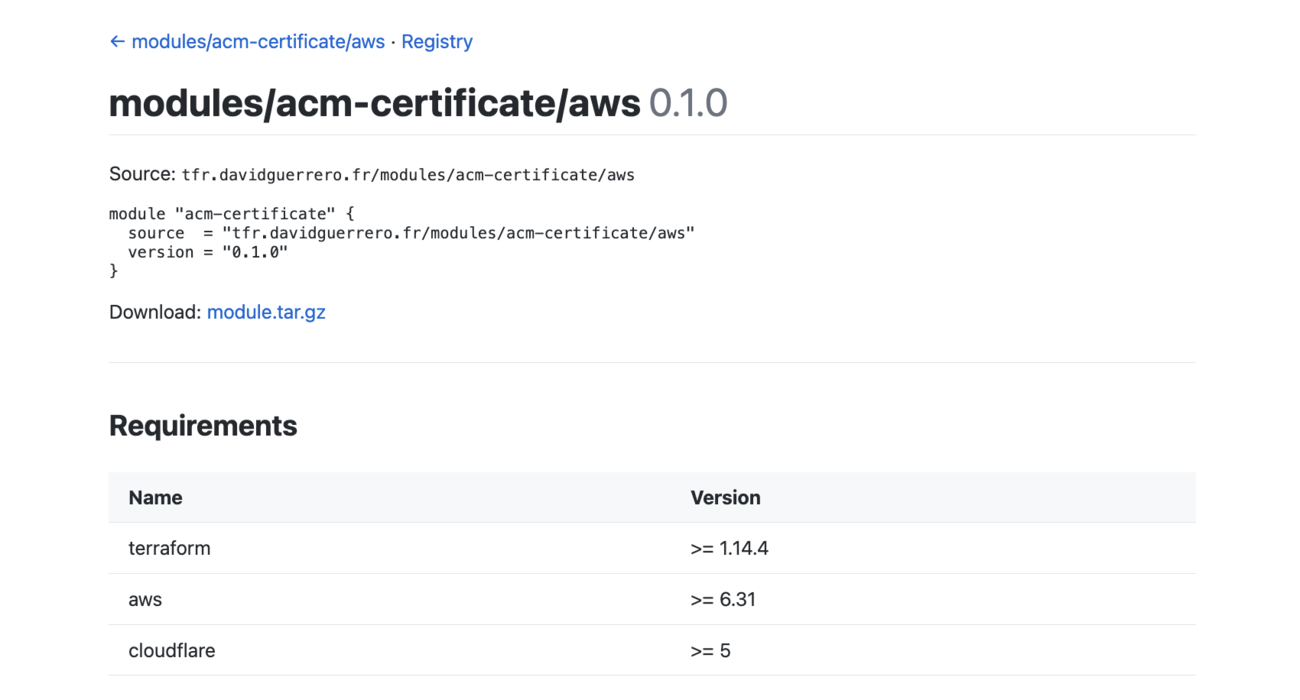
It’s pretty basic but customizable.
Uploading the files is the responsibility of the user, for example by using the AWS CLI. The CDN invalidation paths are provided by tfr-static, though performing the invalidations is up to the user as well.
As examples, you can find my module repository at github.com/Heldroe/terraform-modules/ and my module registry at tfr.davidguerrero.fr.
For more details and a full list of features please check the tfr-static repository. The tool is oriented towards my workflow and a single repository holding all modules, but feel free to adapt it or use it as an inspiration for your own tools!
Pricing
This will of course depend on your storage and traffic needs, though the CloudFront and Cloudflare free plans can get you pretty far.
If you are based in the European Union and/or want to encourage EU-based cloud initiatives, please consider local providers such as Bunny.net for your CDN needs, and Scaleway or OVH for object storage.
Room for improvement
tfr-static, a bucket and a CDN might not cover all your Terraform registry needs yet. The idea here was mainly to show that this is possible and not overly complex. I’ll continue to use tfr-static for my own needs and maintain it as such, though you are welcome to file issues on GitHub if you have suggestions or feature requests!
These are on my list at the moment:
- The provider registry protocol is not handled. Serving files is simpler than the module protocol, but generating them could be more complex.
- Supporting the registry API could be considered, as other systems might rely on it.
- Default HTML templates are pretty basic and only the base template is customizable at the moment.
- HTML documentation paths and registry paths should likely be split to avoid confusion, for example prefixing the registry paths with
/v1/. - More archive formats than
.tar.gz. - Dark mode support, for better browsing at night :)
Thoughts from readers