A minimal fault-resilient PostgreSQL cluster running in k3s
While researching a self-hosted analytics solution for this blog, I quickly settled on Umami. It fits my purpose while keeping a minimalistic vibe. It also uses PostgreSQL, which I planned to use anyway for other features.
Uh-oh, that means I need to self-host PostgreSQL!
Alright, let’s go with a simple single-node k3s installation on a Hetzner VPS. Surely that must be the most cost-efficient option!
Well, what if the node goes down? Do we lose the data? Should we use a cloud volume to persist the data? But what if that one is lost? Add backups into object storage? Fine, we’re not losing data anymore. What if I need to update the k3s version, or the Postgres version, or the operating system’s version, or…
What’s the smallest fault-resilient PostgreSQL cluster I can run in k3s with Hetzner nodes?
Here are the constraints:
- Nodes can be taken down one at a time with minimal downtime (self-healing)
- Data is continuously backed up and allows for fast disaster recovery
- Use as few nodes as possible, of the smallest type possible
This means the database is nearly always-on for continuous operations, while nodes can be safely taken down one by one for maintenance (version upgrades, etc.). It’s perfect for my needs, as the availability requirements for a personal blog are not that extreme.
The solution
We need multiple nodes. That means k3s must run as a cluster with an odd number of nodes to maintain an etcd quorum, so at least three. Using only two nodes is technically possible in k3s with an external database, but we’d then get into a chicken-and-egg situation.
My k3s setup is fully defined in custom Terraform modules, but if you want an easy setup there are existing tools out there like hetzner-k3s or terraform-hcloud-kube-hetzner to get started quickly.
To handle the PostgreSQL deployment within k3s we’ll use CloudNativePG. I discovered it during this project and I must say this is probably the best way to run PostgreSQL within a Kubernetes environment. It offers cluster mode with replication, automated failover, and backups to object storage via its Barman Cloud plugin.
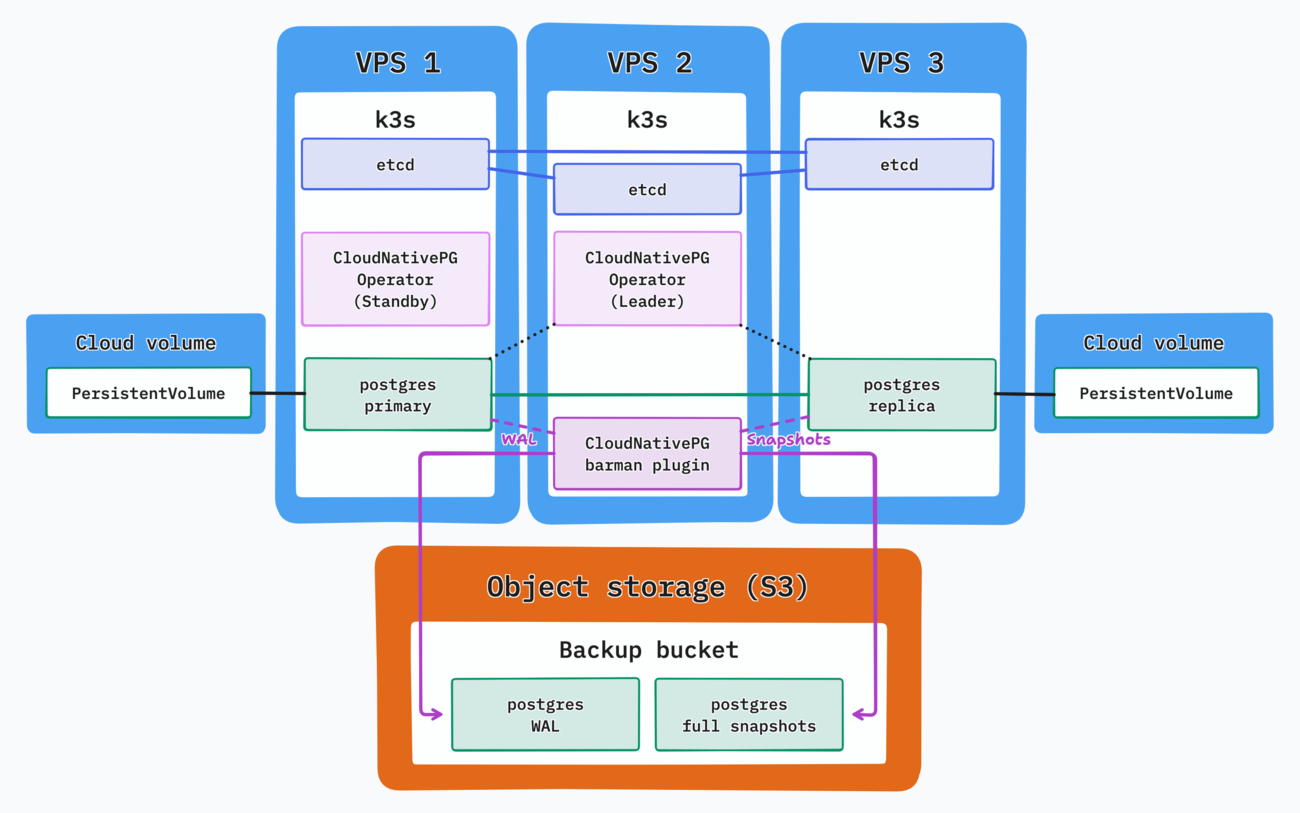
Bring any node down and another will take over.
With this setup I can manually drain nodes to perform maintenance on them, or even delete them entirely and bring up fresh nodes to join the cluster.
In case of a disaster like a multi-node failure or the loss of both volumes, we can use the backups from the object storage to restore the cluster. It is wise to select a different region and even a different hosting provider for your object storage backups. Note that CloudNativePG also offers point-in-time recovery via WAL backup & restoration.
The volumes themselves are attached through the Hetzner CSI driver which pretty much worked out of the box through the provided Helm chart.
You might want to set the reclaimPolicy to Retain for your StorageClass, or at least add an extra storage class with this parameter. This ensures the underlying cloud volumes are never deleted automatically, which can be useful for databases.
Costs rundown
Using the latest Hetzner price adjustments (valid from 1 April 2026):
- 3x
CAX11(ARM) servers + IPv4:14.97€ - 2x Cloud volumes (min. size 10 GB):
1.144€ - Object storage costs for backups:
<1€
The total is a minimum of about 16.50€ monthly for this setup. You can try reducing that by using IPv6 only, but it can be a challenge depending on what you plan to use your servers for. The smallest x86 servers are also slightly cheaper at the moment and could bring the monthly bill under 15€.
Note that the servers are far from being at capacity, though you should plan for some overhead to be able to drain nodes properly, or some pods might not have enough memory!
Coincidentally, this quote is fairly close to the AWS pricing for a single-node db.t4g.micro (1 GB memory) with 20 GB of storage (the minimum allowed): $16.61 (~14.20€) in eu-central-1. For running multi-AZ and having the same failover capacity, the price can be doubled, and doubled again for a 2 GB memory instance type, reaching almost 60€.
This would of course be for the RDS only, without having a whole k3s cluster with extra capacity at your disposal.
Limitations
- Nodes must be drained manually for best results. A node suddenly becoming unavailable can take some time to be detected without additional tooling.
- Each PostgreSQL failover will result in a short downtime. This is inevitable but totally acceptable for my use case.
- Restoration from backup is a manual operation and can take time. Even though CloudNativePG makes it relatively easy, it has limitations such as requiring a different cluster name when restoring it.
Is it worth it?
This can only be answered after going through multiple maintenance operations, like PostgreSQL version upgrades and k3s upgrades, which I haven’t done yet.
If you need a k3s cluster anyway and you care about your cluster and database’s reliability, I’d say yes. I can run both Umami and its database within the cluster.
If you have very small needs you might want to go for a single node with backups. Maintenance operations would create longer outages but the costs would be slashed.
And of course if you have the budget and don’t want to self-host, there are plenty of hosted PostgreSQL providers out there :)
Bonus: putting it to the test
Funnily enough, I received a maintenance notice email from Hetzner just as I was about to publish this article.
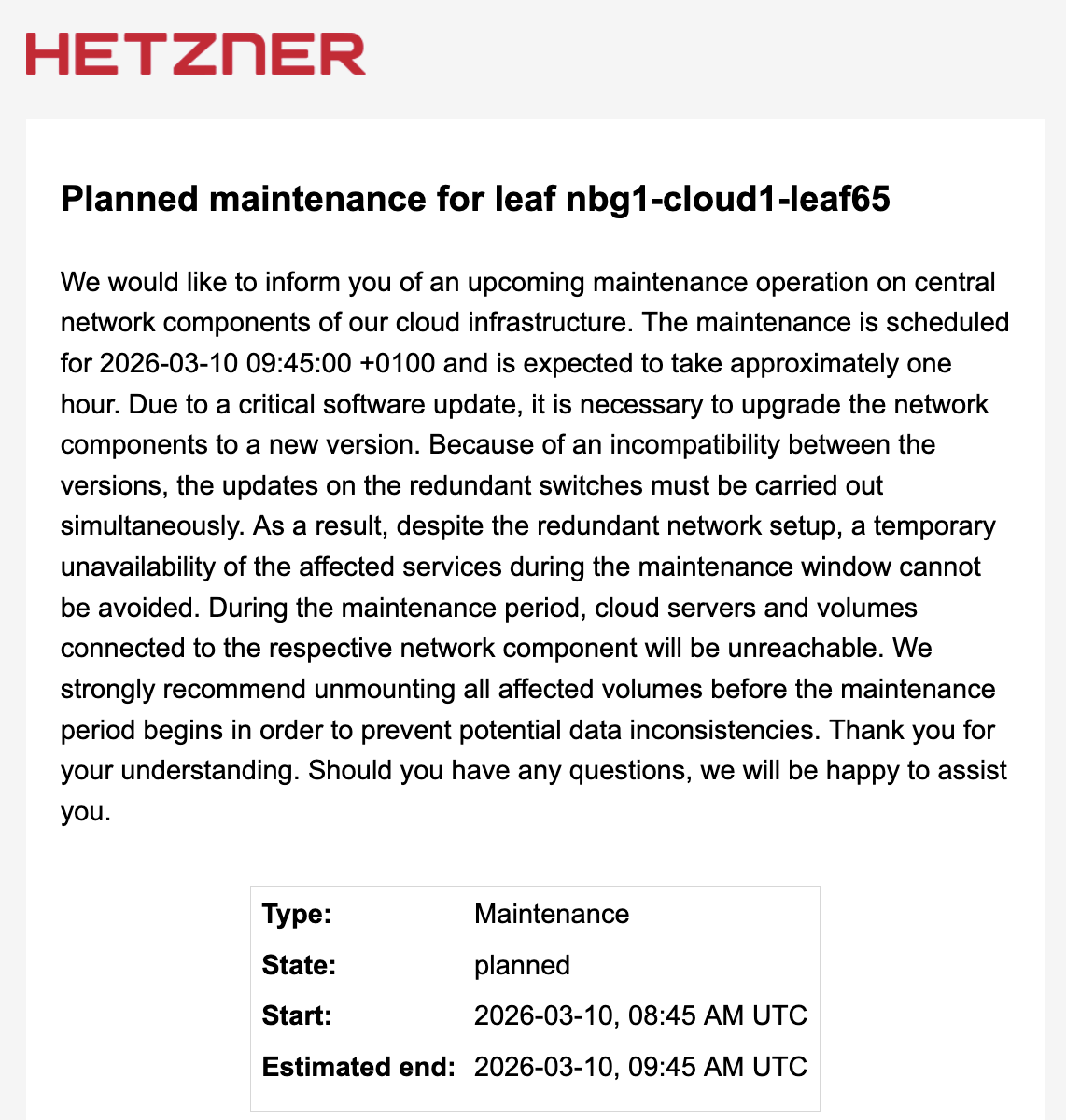
Of course it’s about both of my volumes!
All 3 nodes exist in the same Hetzner location (Nuremberg) as capacity issues in Falkenstein don’t allow me to go for a multi-location cluster using the two geographically close datacenters. This didn’t help my chances and I got lucky enough for both of my volumes to be affected by the maintenance operation.
My feelings were a bit conflicted at first:
- I didn’t expect cloud volumes to have that big of a disruption, which is a bit disappointing on Hetzner’s part.
- I was probably right to somewhat over-engineer this whole thing, as dealing with the maintenance got a lot easier.
I reached out to Hetzner’s support and got confirmation that newly created volumes, even in the same location, wouldn’t be affected by the maintenance:
Newly created volumes are not affected by the maintenance. You can create new volumes, migrate the data manually and unmount the old volumes to prevent downtime.
My procedure involved first moving the data to another location (Helsinki) and then bringing it back to Nuremberg. This is relatively fast and not too involved as my volume of data is still small.
- Bring up two new nodes in the new region. I set these as k3s agents rather than servers.
- Cordon all nodes in the old region. This prevents any new pod from being scheduled there:
kubectl cordon <node_name>
- Scale up the PostgreSQL cluster from 2 to 4 pods. The 2 new pods will be in the new region as it’s the only option, and start replicating data there to brand new volumes.
- Set the primary to be in the new region. This can be done and verified using the
kubectlCloudNativePG plugin:
kubectl cnpg status <cluster_name>
kubectl cnpg promote <cluster_name> <node_name>
- Delete the pods in the old region. This will make CloudNativePG attempt to re-create the pods there, but they will remain in
Pendingstate as the nodes are cordoned:
kubectl cnpg destroy <cluster_name> <node_name>
- Downscale the Postgres cluster back from 4 to 2 nodes. This will then keep only the two pods in the new region. If the ones in the old region are still stuck, you can delete them using the command above once again.
Of course, you need to ensure that the cluster is in a healthy state between each of these operations. This doesn’t feel like the cleanest procedure but at the same time it’s one which I didn’t really anticipate.
Having the two PostgreSQL pods and volumes be in separate locations will definitely be at the top of my list once the capacity issues are resolved.
Thoughts from readers